BIM Checklist to Renovate Hotels Without Halting Operations
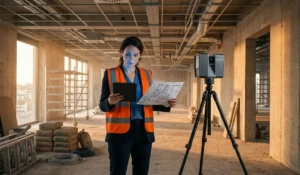
Running a BIM checklist on a hotel renovation with the property still open is possible —and profitable— when you define the 3D laser-scan scope, the level of development (LOD) per zone, and the coordination with operations before the first scanner is switched on. Without that clarity, the model arrives with hidden installations uncaptured, your team re-surveys while guests are still in the adjoining rooms, and the schedule slips. The difference between a controlled hotel renovation and operational chaos isn’t only the Scan to BIM technology you use —it’s the checklist you apply from day zero.
Why Foundtech and not a traditional survey or any other BIM provider? Because scanning a building that stays in operation, without stopping service, is not improvised: it’s exactly what we did at Claraspital, a CHF 140-million hospital in Basel (Switzerland), where we captured more than 2,500 laser scans and delivered a digital twin on an asset that could not be paused. That same standard —European experience alongside BIM Facility AG and local execution, under ISO 19650 certification— is what we bring to a hotel: capturing the as-built reality with millimeter precision, not with measurements assumed from old drawings.
Across Foundtech’s projects, that methodology —BIM As-Built plus digital twin— translates into consistent figures: up to 35% less rework, 25% less execution time, and 22% more operational efficiency in the maintenance phase. In a hotel, those percentages mean fewer floors out of service, fewer complaints at the front desk, and a budget that doesn’t blow out with overruns. This guide gives you the complete checklist you need for your next renovation, step by step.
1. Pre-scan: define the scope before switching on the laser
1.1 Map the critical zones and operational constraints
Before your team reaches the lobby with the laser scanner, you need an operational heat map that distinguishes what gets scanned, when, and under what constraint:
- High-occupancy areas: lobby, restaurants, pool, gym (peak hours: 7-10 AM, 6-9 PM).
- Hidden technical zones: plant rooms, electrical substations, MEP ducts in interstitial spaces.
- Restricted spaces: occupied rooms, 24/7 service areas, kitchens in operation.
- Critical non-visible installations: hydraulic lines under the slab, wiring in ceilings, rooftop HVAC systems.
A typical scenario that justifies this step: if the scope doesn’t specify scanning the electrical substation, the BIM model is delivered without the ability to plan the new boiler room. The cost of that omission is measured in weeks of re-scanning and stalled work —exactly what a well-defined checklist prevents.
1.2 Set the level of development (LOD) per zone
Not everything needs LOD 400. LOD is the metric that turns the word “detail” into a measurable technical definition; set it according to the real need of each zone:
| Hotel zone | Recommended LOD | Why |
|---|---|---|
| Façades and envelope | LOD 300 | Enough for architectural design and energy calculations |
| Typical guest rooms | LOD 350 | Enables furniture, services, and finishes design |
| MEP rooms (mechanical, electrical, plumbing) | LOD 400 | Needed to coordinate hidden installations |
| Industrial kitchens | LOD 400 | Equipment, exhaust, gas, special drainage |
| Public areas (lobby, ballrooms) | LOD 300-350 | Balance between detail and modeling speed |
Quick checklist:
- Do you need to model every light fixture, or just the connection points?
- Do you need fixed-furniture geometry, or is its location enough?
- Does the project include a structural extension that requires LOD 400 on columns and beams?
To understand how laser scanning becomes verifiable geometric evidence that informs every LOD decision, see: Scan to BIM.
1.3 Coordinate scan windows with operations management
3D laser scanning in hotels is not improvised. Work with the operations director to:
- Define low-impact windows: early mornings (2-6 AM), weekdays with lower occupancy.
- Block strategic rooms: reserve full floors for intensive scanning and offset with guest upgrades.
- Brief the team: train front desk, housekeeping, and security on the process to avoid false alarms.
A visual signage protocol (cones, bilingual signs) lets staff identify scanning zones without interrupting the technicians.
2. During the scan: capture every point cloud as evidence
2.1 Verify coverage in real time (don’t wait for post-processing)
Coverage errors are discovered late and cost dearly. Validate on site:
- Sufficient overlap between consecutive scans for a gap-free registration.
- Recording hidden installations: if there are removable ceiling panels, scan before and after removing them.
- Shadow zones: behind heavy equipment, under stairs, inside wall cavities.
Key tools: scanners with a touchscreen for previewing (Leica RTC360, Faro Focus) and field alignment apps (Autodesk ReCap Pro mobile).
2.2 Document special conditions and anomalies
Not everything fits in the point cloud. Record in parallel:
- Geotagged 360° photographs of each typical room.
- Damage notes: cracks, moisture, corrosion in installations.
- Material identification: distinguish concrete walls from drywall (it affects structural calculations).
Illustrative use case: in a historic hotel with adobe walls, the 3D scan can reveal out-of-plumb conditions the eye doesn’t catch. Without parallel photographic documentation, the structural team wouldn’t prioritize reinforcements before the intervention.
That verified survey is what underpins the As-Built BIM modeling on which the entire renovation is designed.
2.3 Scanning MEP installations: the most critical link
Most conflicts in hotel renovations occur in hidden installations. Your MEP checklist should include:
- Scanning technical plenums (spaces between slab and ceiling).
- Recording the real diameters of HVAC ducts (don’t assume measurements from original drawings).
- Identifying valves, access points, and connections in hydraulic networks.
- Mapping electrical cable routes in trays and conduit.
Modeling parametric families of MEP equipment (boilers, chillers, air handlers) from millimeter-precision scans drastically reduces the coordination conflicts that otherwise show up on site.
3. Post-scan: turn point clouds into actionable BIM models
3.1 Cleanup and data segmentation
A raw point cloud is visual noise. Before modeling:
- Remove temporary elements: people, cleaning carts, movable furniture.
- Segment by discipline: architecture, structure, MEP, landscaping.
- Classify by floor level: it streamlines assigning modeling teams.
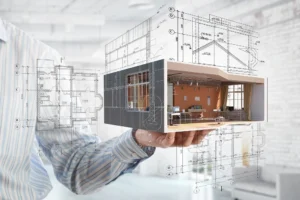
3.2 BIM modeling focused on coordination
The BIM model is not a pretty drawing: it’s a coordination tool. Ensure:
- Federated models by discipline (architecture, structure, MEP, interiors).
- Automated clash detection with Navisworks or Solibri to spot collisions between ducts and beams.
- Constructability notes: flag zones where installation requires a specific sequence.
This coordination isn’t a methodological whim: the international standard ISO 19650 —under which Foundtech operates— defines precisely how this information is produced, validated, and delivered so the model is traceable and auditable, not a file each discipline interprets its own way.
Illustrative practical example: in a renovation of hundreds of rooms, detecting interferences early between new exhaust ducts and existing beams lets you resolve them in the design phase —where fixing costs a fraction of what it would as a change order on site.
When the hotel needs that model not only to build, but to anticipate events and operations, it’s worth seeing it applied in a real case: how to prepare your hotel with digital twins.
3.3 Cross-validation: BIM model vs. reality
Before releasing the model to construction:
- Control measurements: compare 10-15 critical dimensions (floor-to-floor heights, corridor widths) between the point cloud and the BIM model.
- On-site review: take the model to the field on a tablet and validate it with the maintenance manager.
- Stakeholder sign-off: architect, structural engineer, MEP contractor.
Define a clear tolerance in the contract (on the order of millimeters) and verify the model against the point cloud before releasing it.
4. Coordinating with operations: the art of renovating without closing
4.1 Phased planning (smart zoning)
Split the project into independent operational zones:
- Phase 1: a full floor blocked off, guests relocated.
- Phase 2: public areas during night hours.
- Phase 3: façade and rooftop MEP systems (minimal impact).
Benefit: you keep much of the hotel operating during the work, instead of closing entirely.
4.2 Continuous communication with guests
A well-executed Scan to BIM project doesn’t surprise guests:
- Notices at reception and in rooms: “We’re improving your experience with BIM technology.”
- Discounts or upgrades: offset the inconvenience with tangible benefits.
- Express complaint hotline: a direct line to the project manager.
4.3 Sync with the property management system (PMS)
Integrate the construction schedule with your Property Management System:
- Automatically block rooms in scanning or construction zones.
- Adjust dynamic rates for rooms far from the work.
- Notify housekeeping about restricted access.
That same logic of planning interventions with no downtime is what the digital twin carries into the hotel’s continuous operation, as in scheduled shutdowns with a digital twin.
5. Final deliverables: beyond the BIM model
5.1 Certified As-Built model
On completion, deliver:
- As-Built BIM model with a validated level of detail (LOD 350-400 by zone).
- Registered point cloud (E57, RCP format) for future reference.
- 2D drawings derived from the 3D model (plans, sections, MEP details).
File standard: IFC 2×3 or higher —the industry’s open format— for interoperability with any facility management software, without being locked to a single vendor.
5.2 Digital twin for post-renovation operations
The real return arrives after the work:
- From digital inventory to active twin: start with a “passive” twin for documentation and, when you need it, connect real sensors to visualize temperature, vibration, and flow in 3D.
- Integration with your CMMS/ERP: connectors to systems like SAP or Maximo so work orders appear on the 3D model.
- Maintenance without opening walls: plan HVAC equipment changes on the model, not on assumptions.
This is where the 22% improvement in operational efficiency materializes: a hotel that runs its maintenance on a digital twin stops reacting to failures and starts anticipating them, with the certainty of knowing exactly what lies behind every wall.
5.3 Training the facility management team
A BIM model without trained users is a dead file. For the investment to pay off, the handover should include:
- Training the maintenance team on querying the model and the digital twin dashboard.
- Usage manuals with concrete cases (how to locate a valve, how to query an MEP family).
- A support period to resolve questions while the team adopts the tool.
Conclusion: your BIM checklist is the insurance policy against overruns
Renovating a hotel that stays open isn’t only a logistical challenge: it’s a stress test for your BIM methodology. Every decision about scan scope, level of detail, and coordination with operations translates into days won or lost, satisfied guests or bad reviews, a controlled budget or an overrun. The BIM checklist in this guide isn’t theory: it’s how you capture the as-built reality with millimeter precision and turn it into certainty for the whole project.
For operations directors, architects, and hotel project managers who want to cut rework by 35%, time by 25%, and improve operational efficiency by 22%, the first step isn’t hiring the contractor: it’s demanding a survey that reflects the as-built reality. At Foundtech we support clients across Europe and the Americas with more than 200 projects and 10 million m² modeled under ISO 19650 certification, combining 3D laser scanning, As-Built BIM modeling, and digital twins so your renovation is planned, executed, and operated as a strategic ally of your investment: with data, with protocol, and with zero room for improvisation.
Your next renovation deserves millimeter precision. Request your free project assessment here.